Direct Debits
A direct debit is an instruction, called a mandate, from a customer In the context of the Cloud Monetisation Platform, an individual or organisation who has signed an agreement to take goods and services from a service provider. A customer receives a bill associated with one or more subscriptions, and can be a single end user or a large company with many subscriptions assigned to one agreement. (debtor) to their bank or payment services provider, authorising an organisation (creditor) to collect variable or fixed amounts from their account In the Cloud Monetisation Platform, a billing entity that can be used to manage payments on one or more subscriptions or payments for services. An account can hold details such as payments or invoices., as long as the customer is given advance notice of the collection amounts and dates.
CMP Converged Monetisation Platform. The MDS Global product that supports customer care and billing for digital service providers. supports the Bankers Automated Clearing Services (BACS Bankers Automated Clearing Services. A system in the United Kingdom for making payments directly from one bank account into another.) Direct Debit Scheme for the electronic processing of direct debits. BACS is the company that runs the Direct Debit Scheme in the UK, allowing service providers to regularly collect recurring payments from their customer base.
The service provider The owner of the infrastructure in which accounts will be created. The Service Provider can host and operate the instance of CMP, or CMP can be provided as a Managed Service. and the end customer must agree the amount to be claimed and the date of collection. Once agreed, the agreed amount is automatically debited from the end customer’s bank account and credited to the service provider’s bank account.
The BACS UK Direct Debit Scheme is made up of six extracts controlling how debits and credits are applied:
- AUDDIS Automated Direct Debit Instruction Service. A service that allows you to send Direct Debit Instructions to a customer's bank electronically. (Automated Direct Debit Instruction Service) extracts automates the lodgement of direct debit Instructions (mandates) from the service provider (originator) to the end customer’s (payer’s) bank electronically.
- ADDACS Automated Direct Debit Amendment and Cancellation Service. An electronic messaging service that allows banks to notify service users if changes are made to a customer's Direct Debit Instruction (DDI), for example a cancellation or an account transfer. (Automated Direct Debit Amendment and Cancellation Service) extracts contain details of any invalid direct debit Instructions for CMP to process.
- Direct Debit extract contains details of direct debit payments due for collection. Direct Debit extracts are transmitted to BACS to debit the required amount from the end customer.
- ARUDD Automated Return of Unpaid Direct Debits. The automated system used by the banks to return unpaid Direct Debit payments. (Automated Return of Unpaid Direct Debit) extracts contain details of payments that are unable to be processed by the banks. ARUDD extracts are sent from BACS to CMP for processing.
- ARUCS Automated Return of Unapplied Credits Service. A service related to the BACS payment system that allows the receiving bank to return the BACS Direct Credit automatically to the organisation via the BACS service and provide appropriate information (reason codes) as to why the payment was unapplied. (Automated Return of Unapplied Credits Service) extracts contain details of refunds which are unable to be processed by the banks. ARUCS extracts are sent to CMP for processing.
- AWACS (Advice of Wrong account for Automated Credits Service) extracts contain details of changes to direct debit details when the receiving bank has identified and corrected incorrectly provided details. AWACS extracts are sent to CMP for processing.
For guides and rules for the Direct Debit Scheme, see the BACs website: https://www.bacs.co.uk/resources/direct-debit-and-bacs-direct-credit-guide-and-rules/.
Direct debit payments in CMP involve the following:
- Setting up the direct debit
- Processing the payments
- Handling rejected payments and payment errors and issues with direction debit mandates, such as cancellation by the customer.
The following diagram illustrates how different CMP components are involved in direct debit payments. In this example, a customer calls a CSA Customer Service Agent, Advisor, or Assistant.
A (usually) customer-facing role in telecommunications, such as an agent in a call centre. Variations include CSR (Customer Service Representative) or CEA (Customer Experience Agent) to set up a direct debit payment via AgentView The graphical user interface of the CMP that is typically used by Customer Service Agents to access CMP customer and billing data. In versions prior to CMP 8.0, this was called the CMP GUI.:
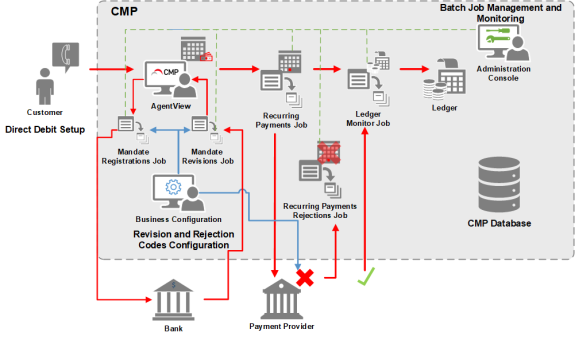
Direct Debit Setup via AgentView and Payment Processing
Direct Debit Setup
A direct debit can be set up as follows:
- In AgentView via a CSA, by using the Account Creation wizard or by changing the payment method to direct debit for an existing account.
-
Via selfcare applications and third party
Of software; a reusable component developed to be either freely distributed or sold by an entity other than the original vendor of the development platform. systems using a SOAP web service XML- or JSON-based information exchange systems that use the Internet for direct application-to-application interaction. These systems can include programs, objects, messages, or documents. where Payment Type is a parameter.For more information, see the Create Account web service in the CMP SOAP Web Services Semantics Guide.
AgentView Setup
When an account is created, the user A person with the capability to log in to the CMP GUI software, such as a customer service advisor or agent. navigates through the Account Creation wizard in AgentView selecting the required Payment Type and entering the payment details.
Where the customer chooses to pay via direct debit the following must be specified:
- Payment Type
- Payment Terms
- Bank account Number
- Bank account Sort Code
- Name of Payer
- Date the mandate was received
- Set Up Method
All Direct Debit fields have standard validation to ensure the correct value type and length are entered. CMP Modulus Checking can also be applied to validate combinations of bank account numbers and sort codes.
When the user has completed the account Creation Wizard, the Account Summary screen opens with the Payment Type shown as Direct Debit.
Processing Direct Debit Mandates
Direct debit instructions are handled in CMP by the following batch jobs:
Mandate Registrations
This job is responsible for generating a batch of new direct debit instructions for transmission to external systems, which in turn transfer these instructions to the paying banks and building societies. Downstream daemons extract this batch, convert the instructions to the required external system format (AUDDIS extracts) and transmit them to the required destination.
If no response is received from external systems, the direct debit Instruction is successful.
Mandate Revisions
When new direct debit instructions are sent to an external payments system, some instructions can fail, for example, due to incorrect bank details. Successful instructions may also subsequently be amended or cancelled by the customer. When CMP receives files (ADDACS extracts) containing rejected, amended or cancelled instructions, these are automatically detected by a dedicated daemon A computer program that runs as a background process, rather than being under the control of an interactive user., which creates a mandate revisions batch in CMP for each file received. This job updates or cancels the relevant mandate records in CMP.
For more information on these batch jobs, see Direct Debits in the CMP Batch Jobs and JSON JavaScript Object Notation. JSON is a lightweight format for storing and transporting data, often used when data is sent from a server to a web page. Schemas Guide.
If a direct debit Instruction is unsuccessful, details of the failure including a reason code are returned via the external systems in the files that are handled by the Mandate Revisions job. These mandate revisions codes are configured in the Payments module of the Business Configuration A module in the CMP Administation console that provides for viewing and modification of business and user applicable system configuration. console.
For more information, see the Payments section of the CMP Business Configuration Overview or the online help in the Business Configuration console.
CMP processes the files, taking the appropriate configurable action against the account. Example actions include but are not limited to:
- Cancelling the direct debit, changing the Payment Type to the default Payment Type
- Requesting that direct debit details are changed and resubmitted
Processing Direct Debits
Direct debit payments are processed in CMP by the Recurring Payments job running in BANK mode.
This job creates a batch of payments due for accounts that have been configured to pay by direct debit. Customers who have payments due are identified using the calculation: current date + predefined number of days.
Also included in the batch are accounts that have approved refunds due.
CMP accounts with due payments/refunds are included in a generic JSON extract file, which can be converted to the required file format by an adapter, expected of the payment provider (the Direct Debit extract). Where a customer has both a due debit amount and an approved refund, CMP creates two separate transactions in the Direct Debit extract.
Direct debits are processed according to the following payment cycle:
- Day One – Input – Direct debit details transmitted to BACS
- Day Two – Processing – Accepted data is processed (the working day before Entry day)
- Day Three – Entry – Direct debits are debited or credited to destination bank accounts
Following the transmission of the extract file, CMP updates the customer's account balance in the CMP Sales Ledger, assuming that no errors will occur in the processing of the payment. Refund transactions are posted to the Sales Ledger using the calculated Posting Date representing when the customer’s bank account is credited. This is handled by the Ledger Monitor job.
For more information, see the following sections of the CMP Batch Jobs and JSON Schemas Guide:
Handling Direct Debit Rejections
Direct debit payments can fail for a number of reasons, such as incorrect bank details, insufficient funds or the customer changing banks. Reject direct debit payments are handled in CMP by the Recurring Payments Rejections job.
These rejections are returned to CMP by external payment handlers in the following BACS extracts:
- Payment and rejection details are returned to CMP in the Automated Return of Unpaid Direct Debit (ARUDD) files if the bank is unable to process the payment.
- Advice of Wrong Account for Automated Credits Service or AWACS files contain the details of failed refunds where the receiving bank is not able to identify the correct bank account details or where a customer’s bank account has been transferred to a new bank.
- Rejected refund details are returned to CMP in the Automated Return of Unapplied Credits Service (ARUCS) file if the bank is unable to process the payment.
Each returned payment includes a reason code. Reason codes are configured in the Payments module of Business Configuration. These reason codes can be configured to determine whether the decline is a:
Soft decline
Soft declines are a result of a temporary error. Payments with soft declines can be retried a specific number of times by including the failed payment on a future Direct Debit extract. The number of retries for a specific reason code is configurable in Business Configuration. Each reason code and number of retries for soft declines has an associated workflow event and the appropriate actions to be automatically completed depending on the failure reason. Once the maximum number of retries is reached the direct debit payment is cancelled and treated as a hard decline.
Hard Decline
Hard declines are permanent errors and are not retried.
For more information, see the Payments section of the CMP Business Configuration Overview or the online help in the Business Configuration console.
When CMP receives files containing rejected transactions, these are automatically detected by a dedicated daemon, which creates a rejected payments batch in CMP for each file received.
This job generates a batch that contains records to reverse each failed transaction from the Sales Ledger. Once this batch has been created, it is detected by dedicated daemons that format the batch and transmit it to the target sales ledger. This job also generates workflows, for example, to send a communication to the customer, processes soft declines to temporarily exclude the account from the automated payments process and processes hard declines to revert the account to the default (manual) payment to make alternative arrangements for collection of amounts due.
For more information, see the Recurring Payments Rejections section of the CMP Batch Jobs and JSON Schemas Guide.
Incoming AWACS files are collected and returned to CMP for manual processing by Business Operations or the Service Provider.
The user updates the direct debit details stored against the account with the correct details supplied in the AWACS file. The configured AWACS Reason Code must be selected prior to confirming the changes.